Scan, search or tap
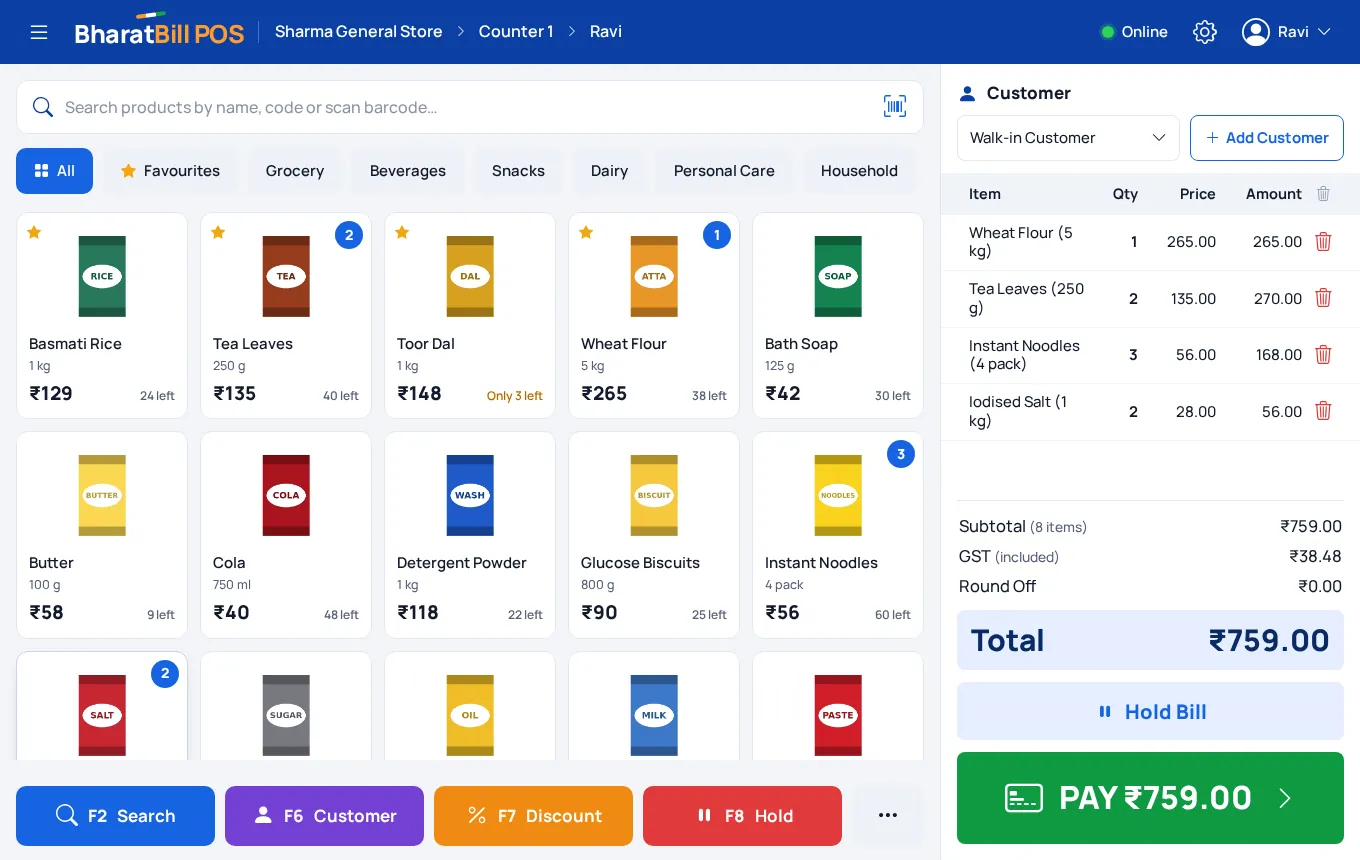
Use a barcode scanner, type a few letters of the name, or tap the product tile. Keep your fast sellers under Favourites.
 AI - Powered
Scan or tap the items, take cash, UPI or card, and hand over the bill. Every counter sale in BharatBill is a proper GST invoice, so your stock, cash book, customer dues and GST reports are already up to date when the customer walks out.
The Free plan bills at the counter within its 10 invoices a year. No card needed.
A counter bill is not a slip of paper you enter into your books in the evening. It is the entry.
Printed on a 58 mm or 80 mm thermal roll, as an A4 GST invoice, or sent as a WhatsApp link the customer can open and download.
The sale is saved as a tax invoice in the counter’s own number series, with HSN codes and tax worked out rate by rate. It is in your GST reports without typing it again.
What was sold comes off your stock at once, and the tile shows how many are left. (Business and Premium.)
Cash goes into the cash book. UPI and card money goes into the bank account you choose. The day’s collection adds up by itself.
A sale on udhaar is added to that customer’s dues. When they pay, the collection is set against their oldest bills.
Built for a queue: scan, scan, Pay, Cash, done.
Use a barcode scanner, type a few letters of the name, or tap the product tile. Keep your fast sellers under Favourites.
Mark an item “price includes GST” and the bill comes to the shelf price exactly, with the tax worked out inside it.
Quick note buttons and the change to give back, a UPI QR for the exact amount, a card reference, or part now and the rest on udhaar.
Customer forgot something? Put the bill on hold, serve the next person, and bring it back when they return.
Type a mobile number. If they are new, add the name and carry on. Their previous dues show before you bill.
Send the bill, or a polite reminder of what is due, through your own WhatsApp with one tap.
Find the bill, pick what came back, and refund in cash or take it off their dues. In an exchange, what came back pays for what they take.
A product that is not in the list yet? Add its name, price and GST at the counter and it is on the bill.
A photo on each tile so anyone at the counter finds the item. Take it with the phone’s camera. (Business and Premium.)
Bills, sales, cash, UPI, card, udhaar, collections and returns for the day, with every bill one tap away.
A locked device can bill and nothing else: your accounts, reports and settings stay out of reach.
More counters, each with its own bill numbers. A PIN for each cashier, with limits on discounts, price changes, cancellations and returns. Shifts that end with a counted drawer. (Premium.)
If you sell things over a counter and want your GST and accounts right without a second job in the evening, this is for you.
Better you hear it from us now.
Start free. Move up when the shop needs it.
| Feature | Free₹0 | Business₹999 a year | Premium₹2,999 a year |
|---|---|---|---|
| POS Billing: scan, tap and bill at the counter | Trial, within the 10 invoices | ||
| Cash, UPI QR, card and udhaar, with thermal or WhatsApp bills | |||
| Returns and exchanges at the counter | |||
| Product photos | |||
| Stock count, low-stock warning and corrections | |||
| Billing counters | 1 counter | 1 counter | Any number, each with its own bill numbers |
| Cashier PINs, permissions and shifts with a cash count | |||
| Inventory: locations, stock vouchers and valuation |
Prices are for a year and include GST. Compare everything in each plan.
You can bill at the counter on the Free plan, within its 10 invoices a financial year (sales and purchase invoices together). For unlimited bills, Business is ₹999 a year and Premium is ₹2,999 a year, GST included.
No. It runs in the browser of the computer, tablet or phone you already have. A barcode scanner and a thermal printer are optional.
Any USB or Bluetooth scanner that types the barcode like a keyboard. For printing, a 58 mm or 80 mm thermal printer or any A4 printer that is set up on your device; bills print through the browser’s print window.
No. The counter needs a connection. If the connection drops while you are taking payment, the sale is retried safely and is never billed twice.
Add your UPI ID in your company profile. At the counter the screen shows a QR for the exact bill amount, which the customer can pay from any UPI app. Once you see the money has arrived, you tap “Payment received”.
Yes. Each counter sale is saved as an ordinary sales invoice with your GSTIN, a running bill number, the date, HSN codes and the tax at each rate, and it is counted in your GST reports. If your business has no GSTIN it prints as a bill of supply.
Yes. Choose the customer, take part of the money or none, and the rest is added to their dues. You can collect it later at the counter and send a reminder on WhatsApp.
Yes. Lock a tablet or computer to the counter and it can only bill. On Premium, each cashier also gets a PIN, with limits you set on discounts, price changes, cancelling bills and returns.
Create a free account, add a few products, and make your first counter bill in minutes.
Start freeBasti, Uttar Pradesh, India
vasantharaj1972@gmail.com
(+91) 7985872766
Prefer to talk? +91-7985872766 · email us
